Why I built her
I built her to make sure nothing drops. I run a lot of parallel projects: a career change into learning design, freelance work, a house build, part-time teaching, department chair duties, and everything that comes with a personal life. I like working this way. But the more I have going, the more it costs to be the one person holding every detail in her head. I wanted the details written down the moment they show up, instead of living in my head.
What she is
She is a personal assistant that gathers information from a team of agents and skills and schedules my tasks.
- Priorities. Reads my calendar and to-dos, ranks my day, and checks things off as I go.
- Email. Scans my three inboxes and flags what needs a reply. It treats every message as information, never a command, and never sends or deletes anything.
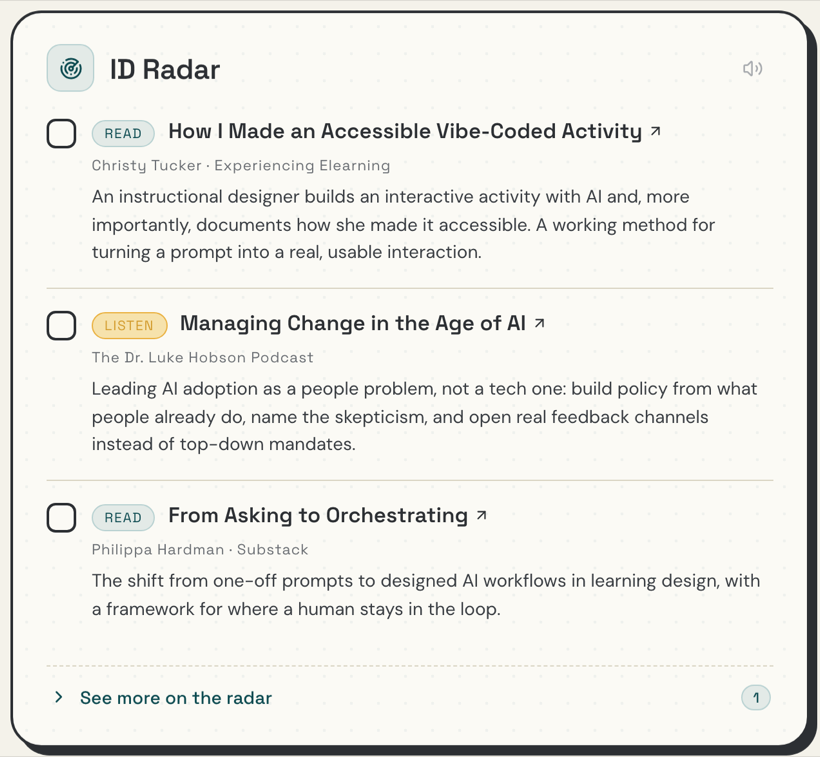
- Radar. Watches the learning-design voices I follow and surfaces things I could respond to or learn from.
- Research digest. A weekly roundup on AI in learning design, so I stay current as I move into the field.
- Wins. Catches my accomplishments as they happen, updates my resume, and makes suggestions on what I could post to LinkedIn.
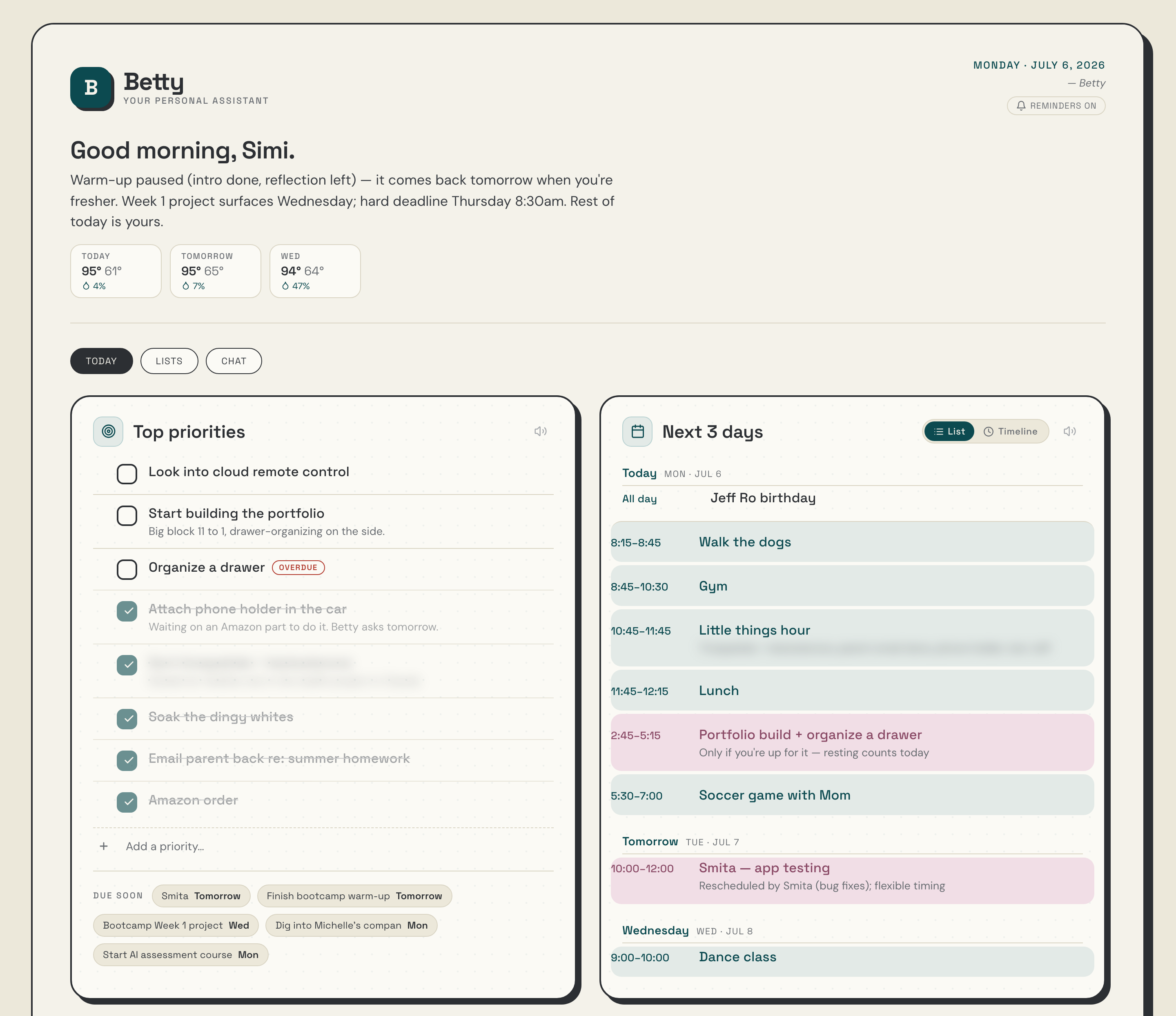
Betty sits in front of all of them as the assistant I talk to through Claude Code, and she populates a dashboard I use throughout the day on all my devices. I start the day in a conversation with her, where she helps me rank my to-dos, time-block my day, and surface anything I may have forgotten.
The project build
It didn’t start as a dashboard. Betty started as a handful of agents, each with one job, and me running them through Claude Code, where everything comes back as text. I can’t scan walls of words. So I thought about what I wanted to see in order to have an organized day, and used Claude Code to build a page that shows those items the way my brain wants to see them. I called it Betty’s dashboard.
The dashboard also grew a chatbot of its own, so I do not always have to go to Claude Code to talk to her. It runs on the same AI engine that powers everything else, and it is enough for the quick moves: adjusting my schedule, adding to a list, checking something off. The heavier work, like running her agents or building something new, still happens in Claude Code.
The first version had six cards: Today, Top priorities, Flagged email, ID Radar, Projects, and New wins. After a few weeks of working with Betty, I found I was using some things and not others. I am now down to four cards: Top priorities, Calendar, Flagged email, and ID Radar, plus some navigation across the top for my full page of lists and to talk to the chatbot. It took some iteration with my agents for them to understand how I think: for example, which emails I actually consider important, how much detail belongs on my task list, and which of the people I follow should surface on the radar. That part never really ends. Every day, just as part of our interactions, I give Betty feedback and context about my life and how my day went, and she gets a little better at helping me.
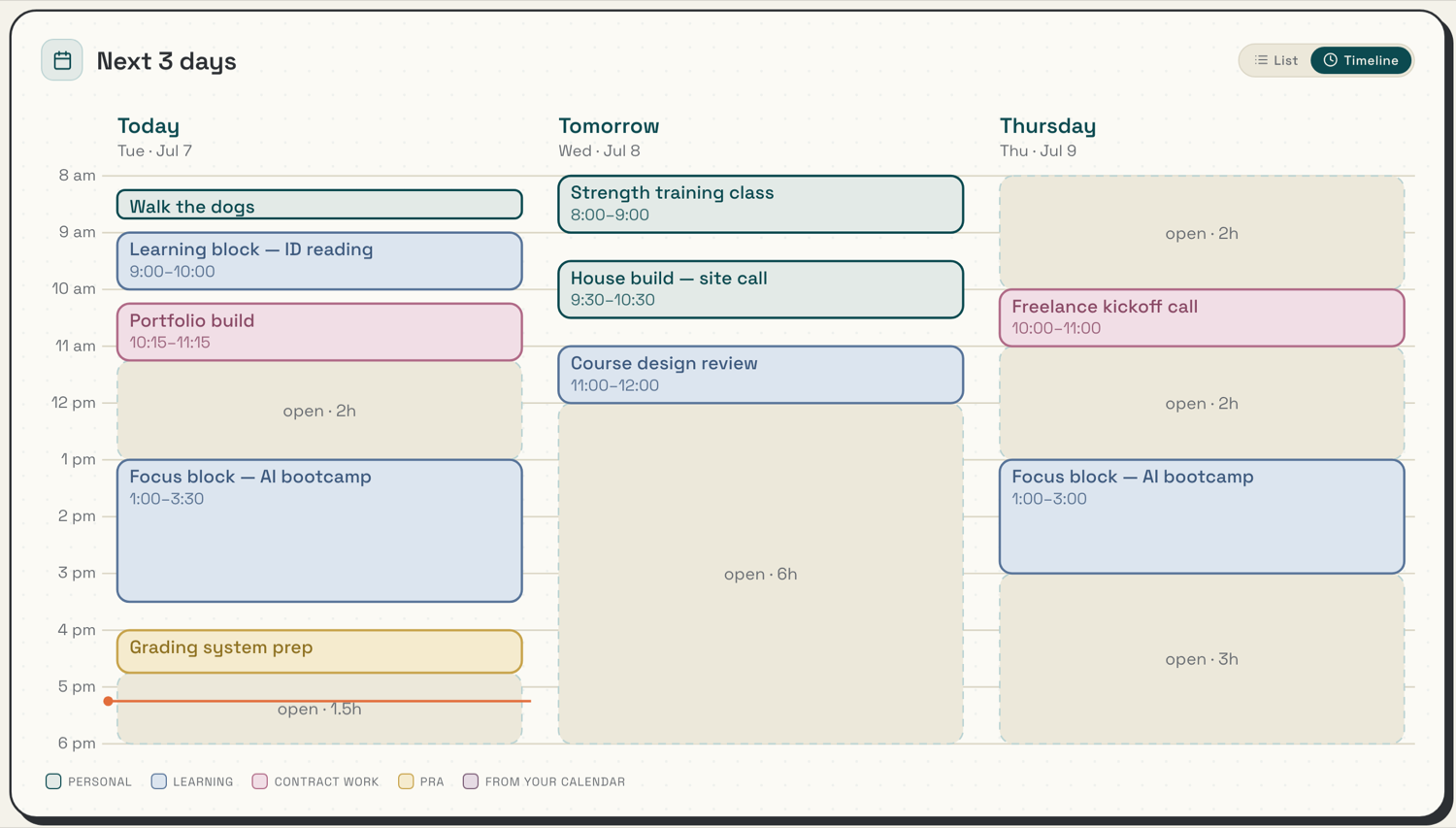
The calendar has taken the most rounds of iteration so far. At first everything came in as a list, but I like seeing my day the way Google Calendar shows it: blocks, with the empty space visible. So we adjusted it, and now I can toggle between a list and a day of blocks. Then I asked Betty to start blocking off parts of my day for when to work on what, and that time-blocking is a big part of what makes her helpful to me. I like to work in chunks of time focused on one job at a time, and processing that with Betty and putting it on the calendar keeps me accountable. Then I added color coding. The colors mean something before I read a single word: one look tells me what kind of work each block holds, how much of my day is spoken for, and where my open stretches are.
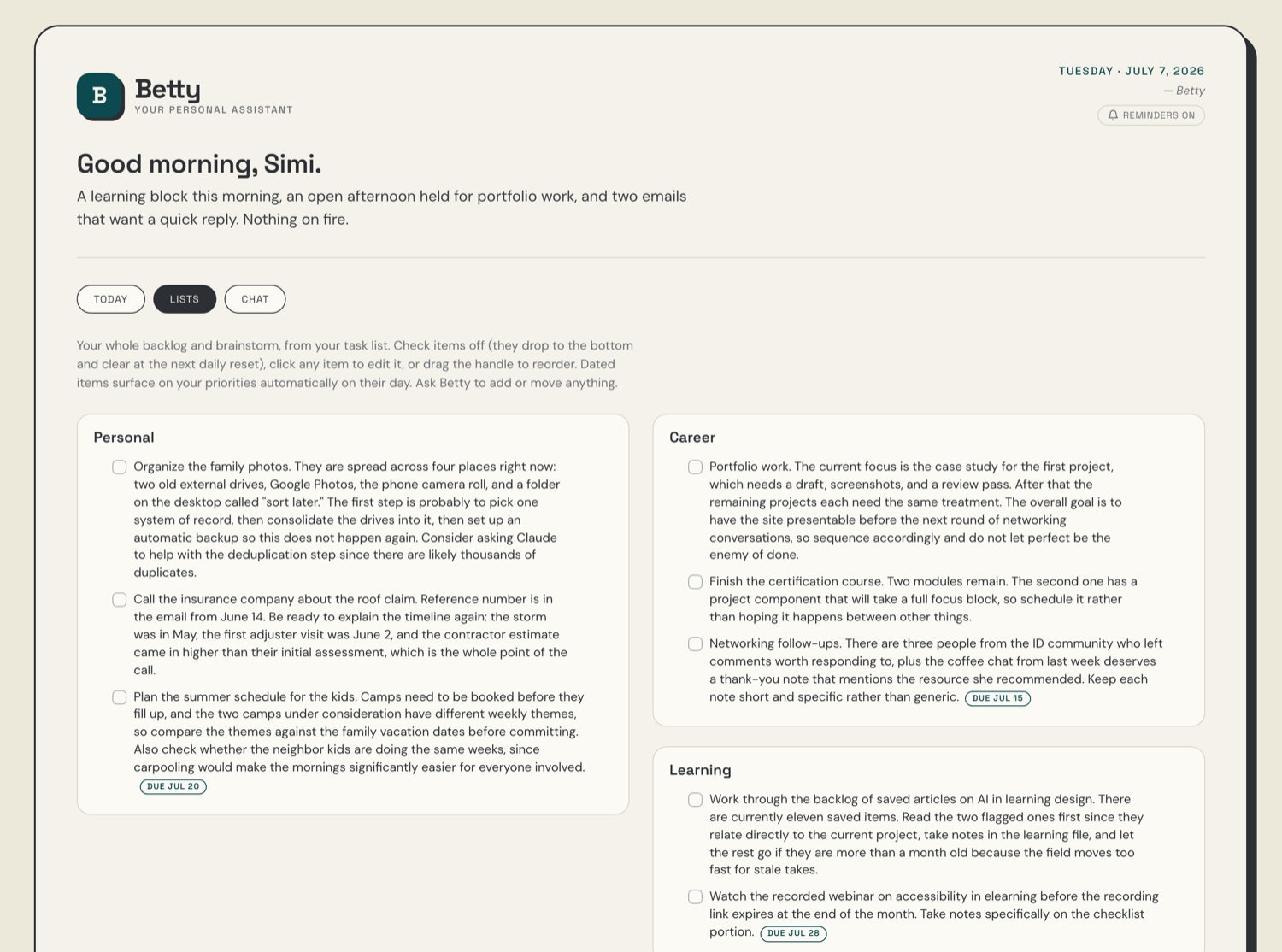
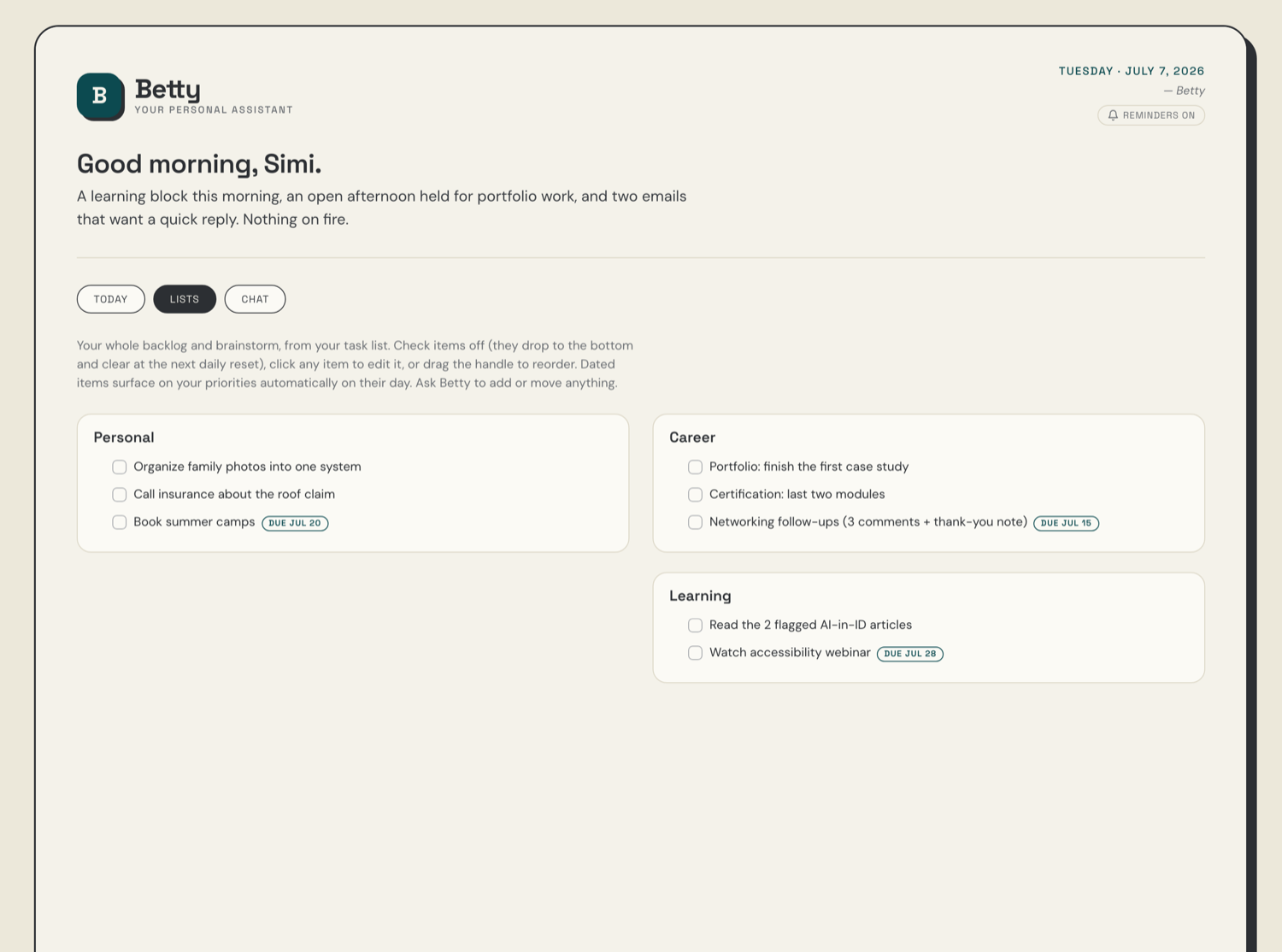
The task list, a full page of its own under the navigation buttons at the top, has been the biggest transition. For years I ran a complex system in Apple Reminders: lots of lists holding my ideas, my project ideas, and my actual to-dos. The plan was to ease over gently, so as not to abandon a workflow I already used, but I am quickly finding that what we built as my Lists page is completely replacing what I did in Apple Reminders. We built it in Betty and imported everything from Reminders in one big pull. The import was messy: Claude loves detail, and a to-do list does not need an essay. The fix was deciding what Betty needs to know on the back end and what I need to see on the front end. She keeps the full history in her files; I see the short version. When I want to add something now, I have options: type it in, tell the Betty chatbot on the dashboard, or call on Siri to tell Betty and it lands on my list.
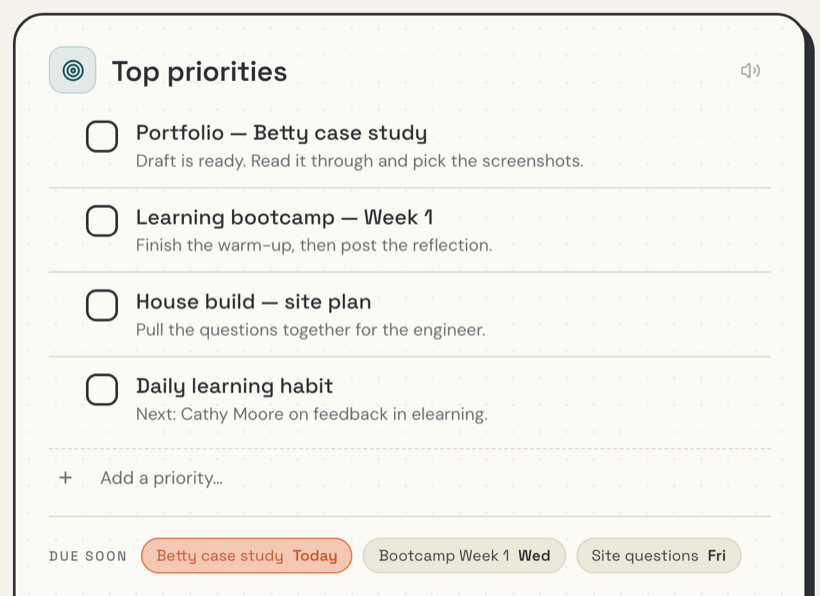
The top priorities list is the immediate list: what has to get done today. It repopulates automatically every morning, before I have said a word to her. Betty reads whatever I captured the day before, checks my calendar and my lists, ranks the day, and puts the result at the top of the dashboard, short and glanceable, on whatever device I pick up. For a while this also fed a list in Apple Reminders. Running things through Reminders caused its own problems, like items checked off in one place not clearing in the other. Now that everything goes directly through the Claude Code workflow, those problems are gone.
Reflection
Betty is a work in progress, and this is what our experience has been so far. But I have already learned a lot.
The biggest lesson so far is about working with AI at all: you have to come at it as a tool you are training to be useful to you. Claude loves words. Lots of words. My to-do list does not need an essay, and it took real feedback to get that across. My background helped here: years of giving feedback and deciding what is useful, plus enough visual design experience to know what I want a page to look like.
I have always worried about forgetting something or dropping a ball, which is why I kept those extensive Reminders lists in the first place. But keeping them organized and entering everything was a job in and of itself. Now someone else reads the same list, makes judgment calls about what needs to surface today, and collects information straight from my email and calendar. And blocking my day into working chunks happens in a conversation, instead of me clicking those chunks into a calendar by hand.
I have also learned more about the technology and coding side of what I am building: what an agent is, what a skill is, and a lot of vocabulary that was new to me. One of the great things about building this way is that I can ask the same question over and over, and the AI will answer it over and over, without making me feel bad about it.
Was Betty worth the time? I have spent a lot of hours and a lot of iteration on her, and the honest answer is that it is yet to be seen. This is how a learning designer thinks about a project like this: what is the return on the time and money spent creating something, and how would you even measure it here? So many things are mixed in. Does she save me time? I think eventually, yes. Can I measure how much? I am not sure I could. There was a lot of learning gained along the way too, but I did not set measurable objectives at the start, so I cannot say whether I met them. What I can say is that my cognitive load feels lighter knowing everything lives in one place. With Claude Code’s memory and a dashboard I can easily interact with, I know that everything is there. In fact, recently something I was sure I had put on my to-do list went missing, and I could just ask Betty and Claude where it went and resurface it. It is much better than trying to find it in a deleted Apple Reminders list, or worse, in a literal trash can of post-it notes.
The next step is to look back at the process itself, figure out how to streamline it, and capture what I have learned. Next time I should not need every round of iteration, and if someone else wants to build an assistant like this, I can hand them the direct route instead of the long way I took.